
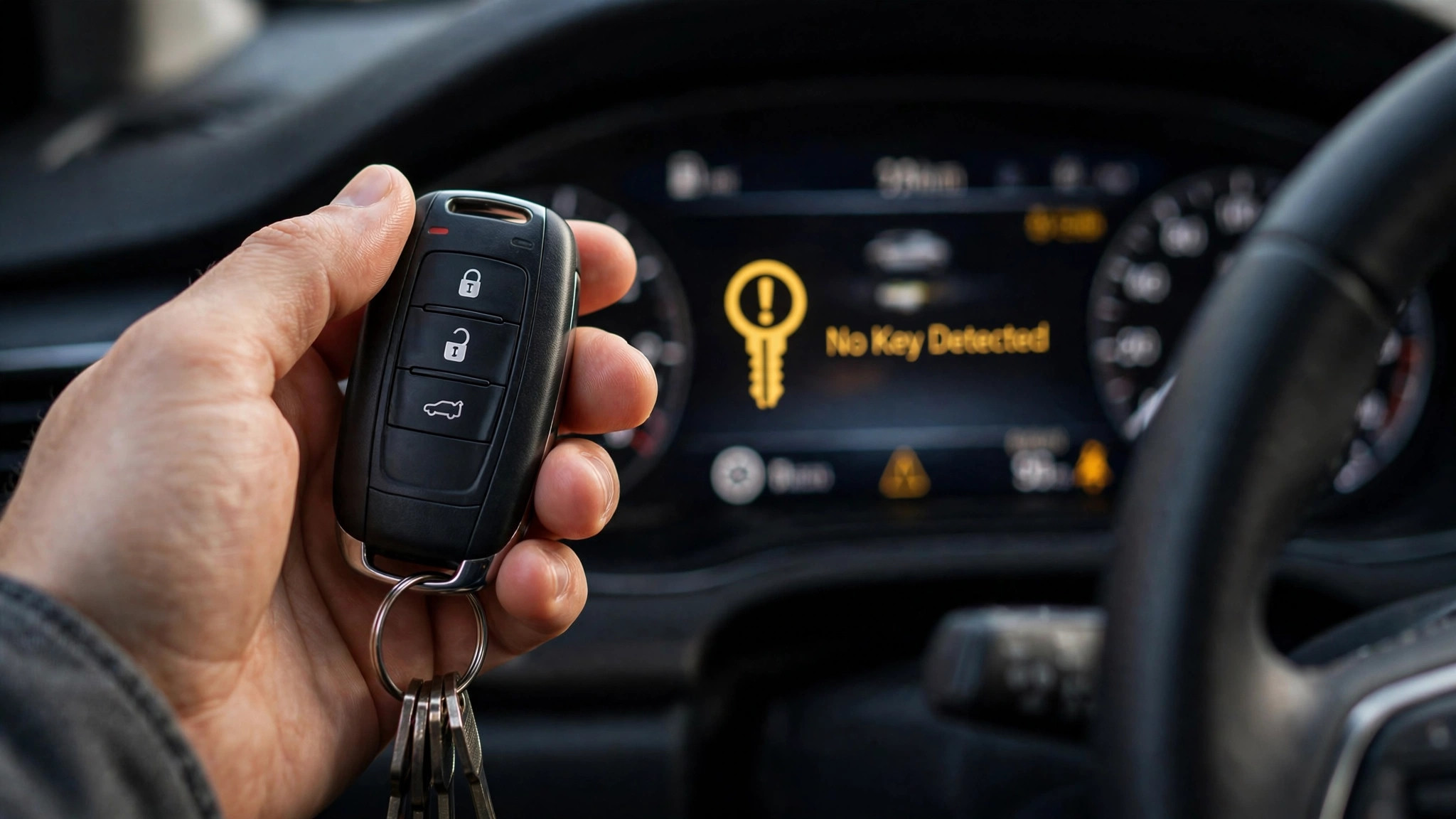

TL;DR: If your Haval Jolion shows “Key Not Detected,” a depleted CR2032 battery in the key fob is one possible cause — a $3 fix you can do yourself. Try your spare key first; if that works, replace the battery. If neither key works, use the manual’s emergency start: place the smart key at the marked position in the console (owner’s manual), then start normally, and check for signal interference.
What “Key Not Detected” Actually Means
Your Jolion uses a keyless entry and start system. When you press the brake and hit the start button, the car sends out a low-frequency signal looking for the key fob. If the fob doesn’t answer — because its battery is dead, it’s out of range, or something is blocking the signal — the dashboard shows “Key Not Detected” and the car won’t start.
When this warning appears, check the key before suspecting the car.
Step 1: Try Your Spare Key
Before anything else, grab your second key fob and try starting the car with it.
If the spare works, you’ve isolated the problem: the first fob’s battery is dead (or the fob itself is faulty). Skip straight to the battery replacement section below.
If the spare doesn’t work either, the problem is less likely to be the key battery — move to Step 3 (emergency start) and Step 4 (interference check).
Step 2: Replace the Key Fob Battery (CR2032)
The Haval Jolion key fob uses a CR2032 coin battery — the same type used in most car keys. They cost a couple of dollars at any supermarket or pharmacy.
To replace it:
- Slide the mechanical key out of the fob (there’s a small release button on the side).
- Use the mechanical key or a flat tool to gently pry open the fob case along the seam.
- Note which way the old CR2032 faces (positive side up), then swap in the new one.
- Snap the case shut and test.
The whole job takes under two minutes. No reprogramming needed — the fob reconnects automatically.
A note of caution: If a new battery doesn’t help, don’t keep buying batteries — move on to the checks below.
Step 3: Emergency Start — Use the Marked Key Position
If the fob battery is completely dead and you don’t have a spare handy, the owner’s manual documents a backup procedure: place the smart key at the marked position in the center console area (2026 owner’s manual, p111), then press the brake pedal and start the car normally.
The exact marked spot can vary slightly by model year — look for the key symbol in your car’s console.
This is a get-you-home trick, not a permanent fix — replace the CR2032 as soon as you can.
Step 4: Check for Signal Interference
If fresh batteries in both fobs don’t solve it, something may be blocking the signal:
- Phone next to the key: a smartphone pressed against the fob can drown out its signal. Keep them in separate pockets.
- Metal objects: keys buried in a bag with coins, a metal tin, or a laptop can shield the signal.
- Other electronic keys: another car’s key fob or a building access tag transmitting nearby can cause confusion.
- Location: strong radio interference (near broadcast towers, some underground car parks) can occasionally disrupt keyless systems.
Try moving the fob away from your phone and other electronics, then attempt to start again.
When to Contact Your Dealer
If you’ve tried both fobs with fresh batteries, attempted the emergency start, and ruled out interference — and the car still won’t detect the key — it’s time for professional diagnosis. Possible causes include a faulty keyless receiver module, a wiring issue, or a fob that needs re-pairing. These are dealer or auto-electrician jobs, not DIY.
FAQ
What battery does the Haval Jolion key use?
A CR2032 coin cell. Replacement takes about two minutes and requires no tools beyond something thin to pry the case open.
Can I start my Jolion if the key battery is completely dead?
Yes — place the smart key at the marked position in the console (see Step 3), press the brake, and start normally.
Why does my Jolion say “Key Not Detected” even with a new battery?
Check for signal interference (phone against the fob, metal objects), try the spare key, and make sure the battery is seated correctly with the positive side up. If it persists, the receiver module may need dealer diagnosis.
How long does a Jolion key fob battery last?
Typically 1–2 years depending on use. If you notice reduced range (needing to be closer to the car to unlock), replace the battery proactively.
Do I need to reprogram the key after changing the battery?
No. The fob retains its pairing through a battery swap and reconnects automatically.
The Bottom Line
When your Jolion shows “Key Not Detected,” start with the key, not the car: try the spare fob, then swap the CR2032 battery (a $3, two-minute job). Keep a spare CR2032 in your glovebox — future you will be grateful.

[…] reading: if the car won’t even recognize your key, start with our key-not-detected checks (the diagnosis-first habit applies there too). And if your MG4’s cabin soundtrack is driving […]
[…] A dead key fob. If the dash prompts you to check the key or the fob isn’t being recognised, try the manual’s emergency start: place the smart key at the marked position in front of the storage box and attempt to start (Haval Jolion 2026 owner’s manual, p111). If that wakes the car, a key-recognition issue is the likely suspect — which may be a spent CR2032 fob battery, but could also be another key-system fault, so don’t assume the fob battery is the whole story. Note that a successful key-rescue only addresses key recognition — it doesn’t exclude a 12V problem happening at the same time. We covered the full key-rescue drill in Haval Jolion Key Not Detected: Checks, Emergency Start & CR2032 Fix. […]