
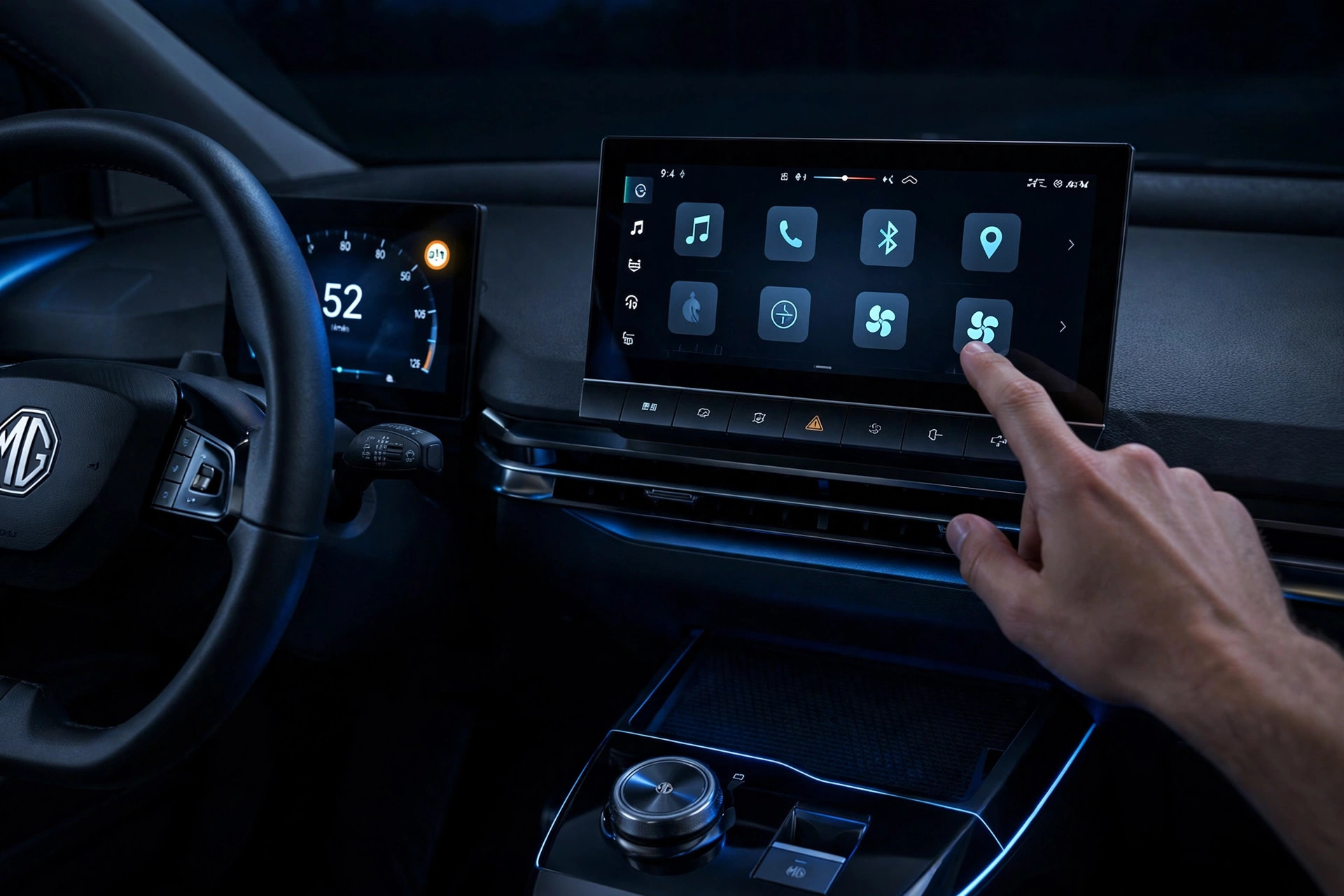

TL;DR: For EU-market MG4s subject to the ISA rules, ISA must return to normal operation each time the vehicle is started. If your car’s Speed Sign Recognition setting disables ISA, you’ll need to switch it off again after restarting — the toggle itself takes about 10 seconds on the infotainment screen.
If your MG4 chimes at you the moment you creep over the speed limit, you’re not alone. It’s a frequent complaint on MG4 owner forums — one new MG4 Luxury owner described the triple chime kicking in “the moment I exceed the speed limit it believes to be in place,” then discovered the setting resets every time they get back in the car. Here’s what’s actually going on, and the fastest way to deal with it.
Why does my MG4 beep when I go over the speed limit?
The beep comes from the Speed Sign Recognition system (MG also calls it Intelligent Speed Assist). A camera behind the windscreen reads roadside speed-limit signs, and when your speed goes over the detected limit, the speed-limit icon on the instrument panel flashes with a prompt message. Many owners also report an audible chime at the same time — though MG’s handbook describes the flashing icon and prompt message without confirming the chime as standard on every version, so the exact warning behaviour can vary by market and software version.
Note: this is separate from the Speed Limit Assistance System, a different function in the vehicle settings that can be set to Intelligent, Manual or OFF and can actively intervene in your speed. Don’t confuse the two — this article is about silencing the overspeed warning, not about the speed-limiter function.
MG’s Australian owner’s handbook describes it plainly: exceed the sign’s speed and “the driver is reminded to reduce the vehicle speed through the audible alarm and prompt message on the instrument pack.” (Note: this wording is from the Australian handbook; the EU MY23 handbook describes a flashing icon and instrument prompt in its Speed Sign Recognition section without confirming an audible chime as standard — so the exact warning behaviour varies by market and version.) The handbook also admits the system isn’t perfect — it “may display an incorrect speed limit value” because of misread signs, bad weather, or roadworks. So some of those beeps are for limits that don’t even apply to you.
Can you permanently turn off the MG4 overspeed warning?
For EU-market MG4s subject to the ISA rules: effectively no. ISA has been mandatory for new vehicle types from 6 July 2022, and for all new vehicles from 7 July 2024, under the General Safety Regulation. The rules require ISA to return to normal operation each time the vehicle master control switch is activated. To be precise: the regulation mandates ISA’s on-state at start-up and requires speed feedback — it doesn’t specifically mandate an audible beep. It’s legislated safety equipment behaving as designed.
This is the part that frustrates owners most. It’s not a bug and it’s not MG being stubborn. The reset-on-startup behaviour is the law.
Outside Europe the picture is murkier. Australia’s current ADR list includes no ISA reactivation requirement, so there’s no equivalent legal mandate there. That said, some Australian owners on local forums report having to switch driver-assist features off at the start of every drive too — that’s owner reports, not regulation, and it doesn’t prove MG uses identical software logic worldwide. Behaviour can also vary by model year and software version, so treat your own car and its handbook as the source of truth.
How to turn off the MG4 speed warning beep
According to the owner’s handbook, the switch lives on the infotainment display. Important: menu names and layout differ between model years, regions and software versions — the steps below follow the EU MY23 handbook; check your own manual if the labels don’t match:
- With the car on (parked is easiest), open Settings on the central touchscreen.
- Go into the vehicle / driver-assistance settings area.
- Find Speed Sign Recognition and toggle the soft switch to OFF.
That’s it for the versions covered here. Note that the EU MY23 handbook describes this soft switch as turning off the Speed Sign Recognition system — it doesn’t guarantee the visual sign display stays while only the chime stops, so check what actually changes on your car. The exact menu labels differ between model years, regions and software versions, and on the handbooks we’ve checked it’s always a touchscreen soft switch rather than a physical button — but confirm against your own manual.
One owner-reported workaround (not confirmed in the handbooks we’ve checked): some owners say they lower the warning volume instead of toggling the system off, keeping a visual reminder without the chime. Your mileage may vary.
Why does my MG4 beep at the wrong speed limit?
Because the camera sometimes reads the wrong sign. The handbook warns about this directly. Common triggers owners report:
- Speed signs on slip roads or parallel roads, read at an angle
- Temporary roadwork limits the camera picks up after the zone ends
- Signs partially hidden by trucks, rain, or glare
When the car thinks the limit is 30 and you’re doing 40 in a 40 zone, the beep feels insane — but the car is reacting to what its camera saw. There’s no calibration you can do yourself; if misreads are constant, it’s worth mentioning at your next service.
FAQ
Will the MG4 overspeed beep stay off after I turn it off?
For EU-market MG4s subject to the ISA rules, no — the system must return to normal operation each time the vehicle is started. On other markets it may also reset; several Australian owners report the same behaviour, but that’s owner reports, not regulation.
Where is the speed warning setting in the MG4 menu?
On the central infotainment screen, under the vehicle or driver-assistance settings. Look for “Speed Sign Recognition” and toggle the soft switch off. Labels vary by model year and region — check your handbook if you can’t find it. (Don’t confuse it with the separate Speed Limit Assistance System, which has Intelligent/Manual/OFF modes.)
Is it legal to disable the MG4’s speed warning?
Yes — the driver is allowed to switch ISA off for a journey. On EU cars the regulation requires it to default back on at every start, so don’t expect the setting to survive the next ignition cycle.
Can I just turn the beep volume down instead?
Some owners say they do this instead of toggling the system off each drive — but it’s owner-reported, not confirmed in the handbooks, so there’s no guarantee the visual display behaves as described. Treat it as worth trying, not as documented behaviour.
Does the MG4’s speed sign recognition affect anything else if I turn it off?
The handbook’s soft switch turns off the Speed Sign Recognition system; it doesn’t disable cruise control or other driver assists. Note that some owners report the related manual speed-limiter setting also forgets its value between drives — the cause hasn’t been confirmed, so don’t assume it’s a fault or a quirk.
The short version: the chime is the audible part of a speed-feedback system, the reset-on-startup on EU cars is regulation — and the 10-second toggle is the practical workaround. Learn the menu path once and it becomes muscle memory.



[…] MG4: How to Turn Off the Overspeed Warning Beep — another MG4 setting that likes to reset itself. […]
[…] Related reading: if the car won’t even recognize your key, start with our key-not-detected checks (the diagnosis-first habit applies there too). And if your MG4’s cabin soundtrack is driving you mad, here’s how to turn off the overspeed warning beep. […]